
Edit Event
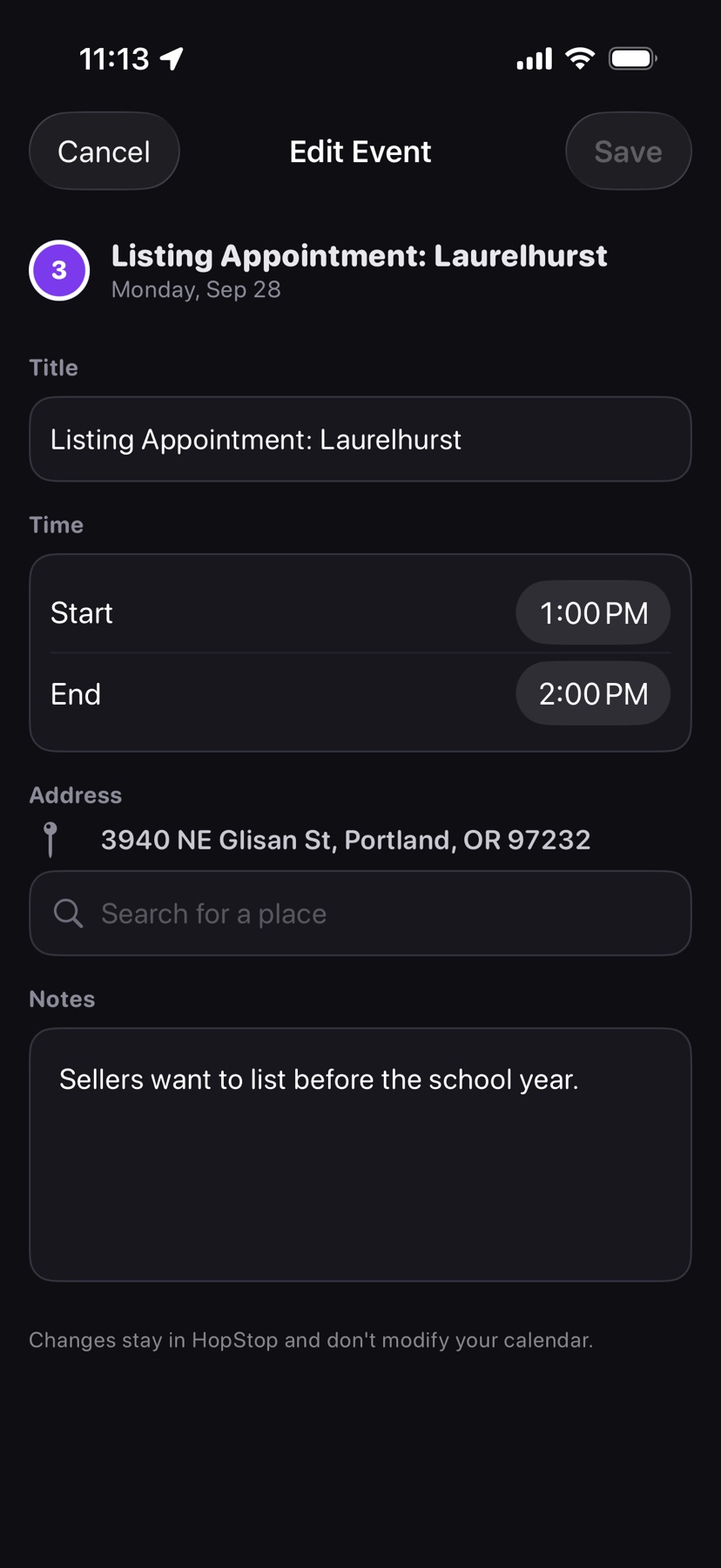
Change an event's title, time, address, or notes for your route. Swipe right on the event and tap Edit, or tap its amber Address or Set Time button.
 1
2
3
4
5
6
1
2
3
4
5
6
- 1
- Event
- The event's calendar title and its date.
- 2
- Title
- Type the name you want on your route. Clear Title Override brings back the calendar title.
- 3
- Time
- Start and End. Moving the start moves the end with it, so the length stays the same. Use Source Times brings back the calendar times; on an all-day event it reads Reset to All Day.
- 4
- Address
- Shows the current address. Type in Search for a place and tap a result to move the pin. Clear Address Override brings back the calendar address.
- 5
- Notes
- Notes you see when you expand the stop's card. Clear Notes Override brings back the calendar notes.
- 6
- Save and Cancel
- Save stays greyed out until something changes, and while the end time is before the start time. Cancel with unsaved edits asks whether to Discard Changes or Keep Editing.
Changes stay in HopStop and don't modify your calendar. They apply to this one occurrence of a repeating event.
To undo every change on the day at once, tap Clear under the list and choose Reset to calendar. Edit on a stop you added opens Edit Stop, where you can rename it or change its time. See also Change a scheduled event.